SIM:RACEHUB
↓ Get the ZIP
Tools & apps · built in-house
PITDOCK logo

PITDOCK Dash

Five SimHub dashboards for five display formats — plus a companion plugin that remembers how you want every single car in every single sim laid out. It exists because I could not find one dashboard for my own rig that worked on a 5-inch display and on an ultrawide at the same time.

Public beta 0.45.0 Free 5 dashboards + plugin 8.7 MB Requires SimHub
PITDOCK GT3 Dash, RACE screen: lap times on the left, gear and speed in the middle, position, setup tiles and sector times on the right

GT3 Dash · RACE screen · 854 × 480

Download — beta 0.45.0

One ZIP with all five dashboards, the plugin, and install instructions in English (README.txt) and German (LIESMICH.txt).

pitdock-dash-beta-0.45.0.zip · 8.7 MB · Windows · SimHub required
SHA-256 c33f7ba9ab8a98a1ed66a30473c582ca6d1da67320a434f84db04cdcc8ae3c49
This is a beta, and I mean that literally. I built and tested these dashboards on my own rig — but a rig is one display, one resolution and a handful of sims. On yours it may look completely different. That is exactly why this is public: I need reports from setups I do not own. Free, no account, no registration — the only thing I ask for in return is two minutes in the feedback form further down.

Five variants, because displays are not the same

Stretching an 800×480 dashboard across an ultrawide always looks wrong. So every variant is laid out again from scratch for its own format — same design language, different arrangement. Take the one that matches your display.

GT3 Dash, 854 × 480

GT3 Dash

854 × 480 · 16:9

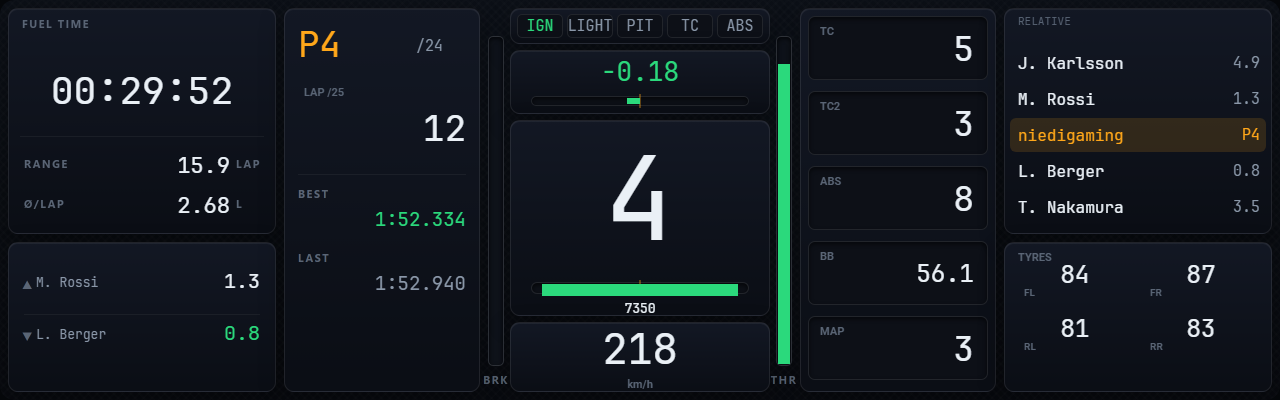
The base variant. 854 × 480 — for 5-inch displays running exactly that, such as the Ascher 5" or the VoCore 5". 4-inch devices at 800 × 480 are covered too: same layout, scaled to fit, with a thin border top and bottom because their aspect ratio is 5:3 rather than 16:9. Nothing is cropped. I built and drove it on an Ascher. Four screens: RACE, LAPS, PIT, TELEMETRY.
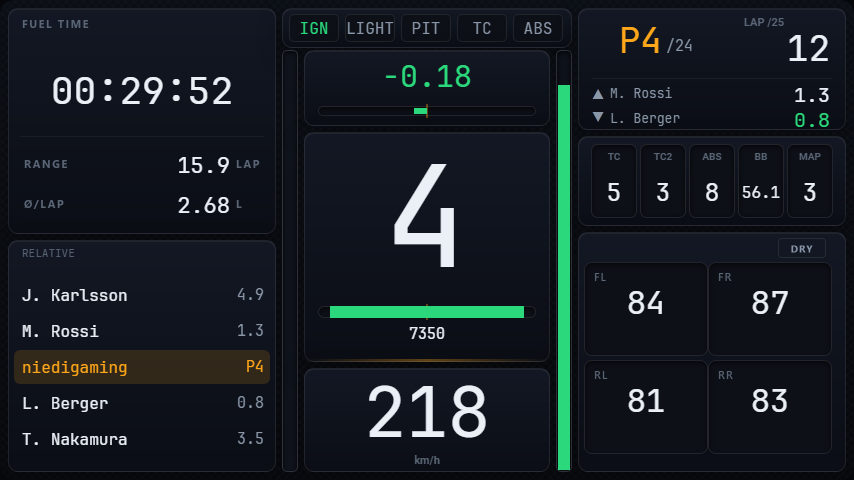
MXL Dash, 1280 × 400

GT3 Dash MXL

1280 × 400 · wide

For wide landscape displays. Adds a temperature quad below the second module slot that taps through tyres, brakes and off.

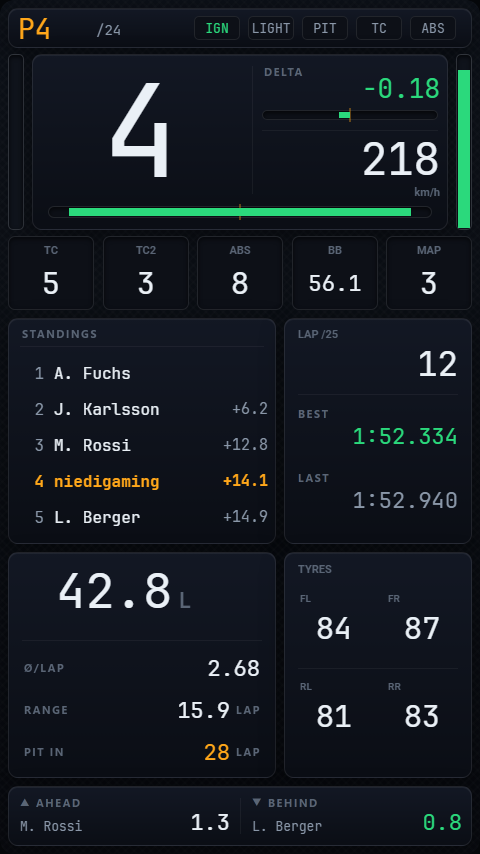
UXL Dash, 1920 × 480

GT3 Dash UXL

1920 × 480 · ultrawide

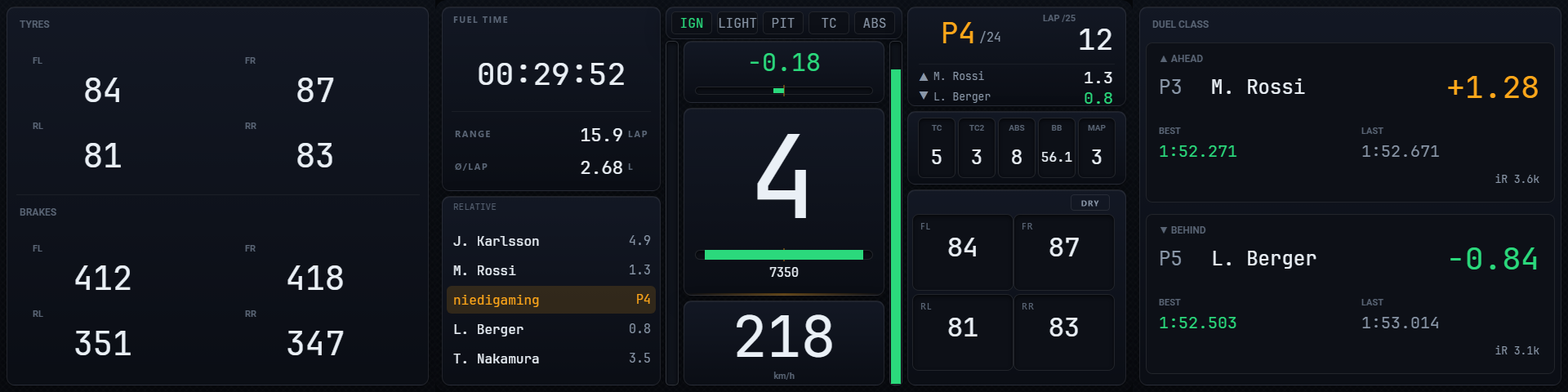
Uses the width for two freely assignable side bands: standings, relative, tyres & brakes, or the duel cards against the driver ahead of and behind you.

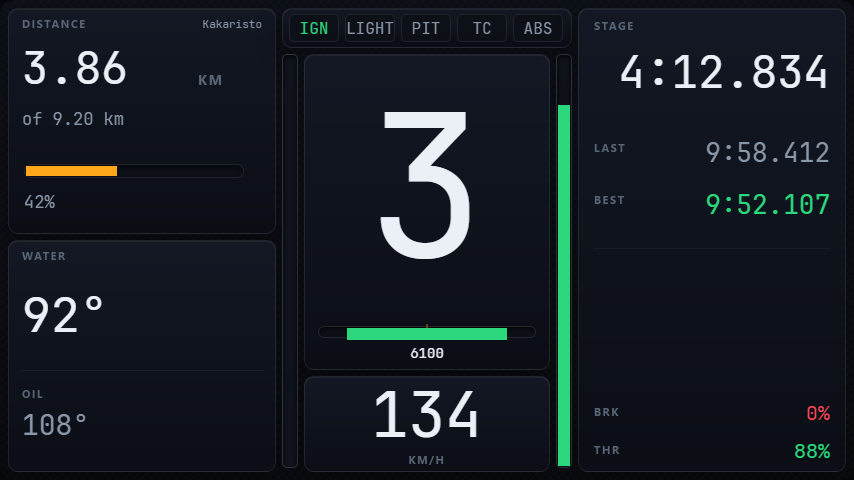
Rally Dash

Rally Dash

Rally layout

No circuit-racing logic: distance instead of position, its own short module cycle, and a handbrake badge tied to the mapped input. For DiRT Rally 2.0, EA SPORTS WRC and WRC Generations.

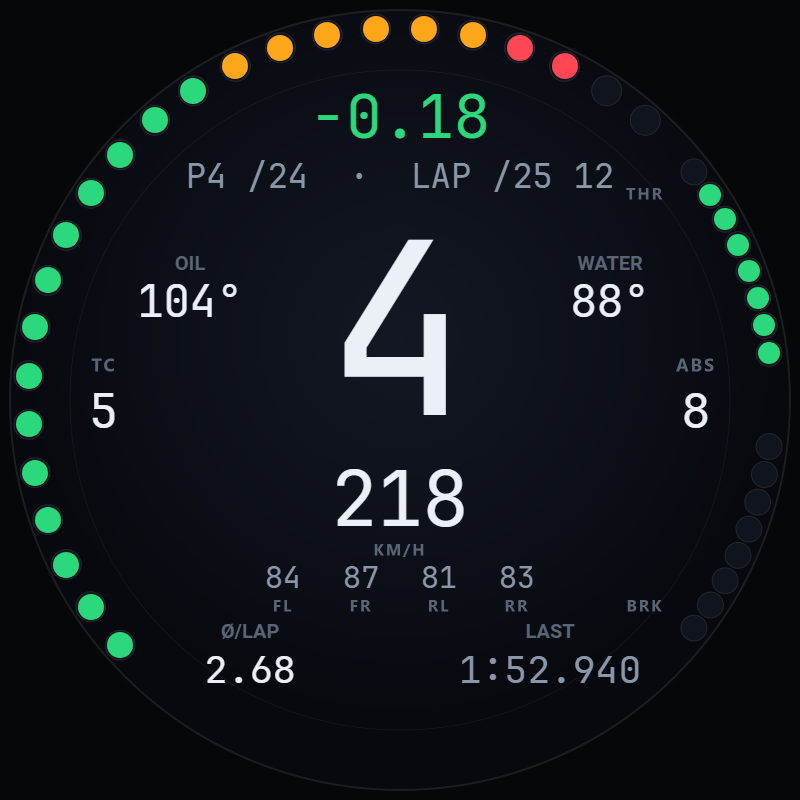
Round Dash, round display

Round Dash

800 × 800 · round

For round displays. Four corner fields you assign yourself — lap time, best, last, water, oil, fuel, consumption and laps remaining — plus a switchable temperature row.

Screenshots taken during development — some from empty sessions, hence the zero values.

What the plugin adds

The dashboards run without the plugin too — they are just static then. The plugin is the part that remembers things.

  • Module slotsThree tiles, 16 modules: times, tyres, fuel, track map, relative, radar, weather, sectors, standings, lap history, distance, brake temperatures, engine, range, refuelling, damage. Tap cycles through — you decide which ones are in the cycle.
  • Remembers every carSet the five setup tiles once for your GT3, once for your formula car — from then on the matching layout loads automatically when you change cars. For an unknown car the plugin samples for six seconds which values it actually reports, and pre-assigns the tiles accordingly.
  • Configurable per simModules, starting assignment, tile profile and Quick View can be set separately for each of the 15 detected sims — with a global fallback for everything else.
  • Quick ViewHold a button to peek at another module, release to jump back. For a glance at the tyres without losing your place in the cycle.
  • Rating cardsiRating, strength of field, incidents and licence from iRacing; plus RaceRoom rating, LFM and SimGrid Grid Rating — depending on what you enter.
  • Announces changesChange TC, ABS, brake bias, engine mapping or ERS on the wheel and the dash briefly shows the new value in large type. In iRacing, engine warnings on top.
  • Sim-specific quirksVirtual energy and battery charge in Le Mans Ultimate and iRacing; per-wheel suspension damage in LMU through its local interface.
  • Blank beats made upNot every sim reports brake temperatures, tyre pressures or hybrid data. If the source is missing, the field stays empty instead of showing an invented number.

Which sims

The dashboards display in any sim SimHub knows. The differences are in the TELEMETRY screen and in sim-specific values.

SimDashboardsTelemetry screenNotes
iRacingyesyesiRating, incidents, engine warnings, battery/ERS
Assetto Corsa CompetizioneyesyesLFM integration
Assetto Corsayesyes
Le Mans UltimateyesyesVirtual energy, per-wheel suspension damage
rFactor 2yesyes
RaceRoomyesyesRating and reputation
F1 25 / 26yesyesERS modes, DRS
Automobilista 2yesno
Assetto Corsa EVOyesnoSimGrid Grid Rating
Project Motor Racingyesno
DiRT Rally 2.0yesnoRally Dash
EA SPORTS WRCyesnoRally Dash
WRC GenerationsyesnoRally Dash
Forza Motorsport / Horizon 5yesnolimited telemetry on the game's side

Tested by me in iRacing, RaceRoom, Assetto Corsa, Le Mans Ultimate, rFactor 2, ACC and F1 25 — with the main classes (hypercar, GT3, formula), on my own dash display and as a window on the monitor. I have not driven every single car in every single sim.

Known limits — read this before you download

  • The TELEMETRY screen stays emptyIt compares your running lap against a reference lap, and it needs the separate PITDOCK overlay tool for that. That tool is not part of this beta, so in this release the screen has nothing to show. Expected behaviour, not a bug.
  • Windows onlySimHub is a Windows application, and so is the plugin.
  • One rig's worth of testingFive display formats, one developer, one dash display — a 5-inch Ascher. The other four layouts I have only ever seen as a window on my monitor, and I have never had a 4-inch 800 × 480 unit in front of me. There is no separate 4-inch layout — they run the 854 × 480 one scaled, which works, but I have not seen it on real hardware. If a variant looks wrong on your hardware, that is the single most useful thing you can report.

Installation

Ten minutes, and the order matters: plugin first, dashboards second.

  1. Close SimHub completelyIncluding the system tray icon. A running instance will not load the new DLL.
  2. Copy Pitdock.Plugin.dllFrom the Plugin\ folder into C:\Program Files (x86)\SimHub\. If Windows blocks the file as “downloaded from the internet”: right-click → Properties → “Unblock” at the bottom.
  3. Start SimHub and confirm the pluginSimHub asks on first start whether to enable the new plugin. After that, “PITDOCK” appears in the left-hand bar.
  4. Import the dashboardsDouble-click the .simhubdash file you want while SimHub is running. Or use Dashboards → Import inside SimHub.
  5. Put it on your displayDashboards → pick the variant → send it to the dash display or a window on your monitor. Use the variant that matches your resolution.
  6. ConfigureSimHub → PITDOCK. Driver name and colours, modules in the cycle, setup tiles — and all of it per sim and per car as well.

And now the actual point: your feedback

I cannot drive every combination of sim, display and car myself. That is why this beta is public. Please get in touch even when everything works — “runs clean, ACC, 5-inch VoCore” is just as useful a report as a bug.

To reproduce anything, I always need four things:

  1. Which sim?
  2. Which dash variant — GT3, MXL, UXL, Rally or Round?
  3. Which resolution and which device?
  4. Which plugin version? (SimHub → PITDOCK → ABOUT)

A screenshot of the dash says more than any description. The form asks for all of it and takes two minutes.

Frequently asked

Do I need SimHub — and does it cost anything?
Yes, SimHub is required and not included. SimHub itself is free to use; some features need a paid licence. PITDOCK Dash is not affiliated with SimHub or its developer.
Will it stay free?
The beta is free and stays free. What happens after it depends partly on what comes back from the feedback. If the project is already worth something to you, a Ko-fi donation is welcome — no feature is locked behind it.
Do the dashboards work without the plugin?
Yes, but with less. Without the plugin you lose module switching, the remembered tile layouts, the rating cards and the telemetry screen. Every binding checks for the plugin itself — the fields simply stay empty otherwise.
My display has no touch.
Everything you can tap is also exposed as a SimHub action you can map to your wheel: PitdockPlugin.NextModuleSlot1/2/3 for the modules, Show next screen for the screen change, and the Quick View assignments as input mappings.
Some fields stay empty.
That is usually deliberate: not every sim reports every value. Brake temperatures, tyre pressures and hybrid data simply do not exist in some sims and cars — the field then stays empty instead of showing an invented number. If a value is missing that you know your sim provides, that is exactly what the feedback form is for.
How do I remove it?
Dashboards: right-click and delete them under Dashboards in SimHub. Plugin: close SimHub, delete Pitdock.Plugin.dll from the SimHub folder, start SimHub. Settings live in SimHub\PluginsData\Common\PitdockPlugin.GeneralSettings.json.
Is the source code available?
No. What is distributed is the finished dashboards and the plugin, not the repository.
Where else can I find it?
The same package is listed on OverTake.gg. This page is always the current version.